
Learn Relay in Minutes. Run Your Entire Fulfillment from One Place.
Pick your role to jump straight to the step-by-step guide. Setup takes minutes — from there Relay does the heavy lifting, every order tracked, inventory updated, customer informed.
Merchants
Send every customer order to your fulfillment center and track it live. No skipped orders, guaranteed.
Fulfillment centers
Receive orders from multiple merchants and automate inventory — all in one place.
Riders
Get customer details on your phone and mark delivered on arrival. No one calls to ask if it got there — the app already shows them.
Take the order. Watch it arrive.
Every customer order goes straight to your fulfillment center for shipping, and you watch it move from warehouse to door in real time. Your customer can track their own delivery with a 6-digit PIN — so they stop asking you for updates, and no order ever slips through.
Step 1: Download Relay. Pick Merchant.
Install the app. Open it. On the role picker, tap the Merchant card.
- Sign up with your phone number — 30 seconds.
- Already have a code from your FC? Tap “I have an invite code” to skip ahead.
Step 2: Paste the invite code your FC sent you.
Your fulfillment center texts you a code over WhatsApp. Pasting it links every future order straight to them — no setup back-and-forth.
- Open Profile. Tap Enter invite code.
- Paste the code (looks like MEA-0E0489). Tap Join.
Step 3: Load your catalog in one sweep.
Products live on the Inventory tab — photos, prices, stock counts. Don't type each one. Import.
- Tap Import products → upload a CSV from a spreadsheet, or
- Paste your store URL — Relay pulls the catalog for you.
- Stock drops itself on every order. You won't accidentally promise something you've run out of.
Step 4: Tap the orange + to start an order.
Every order you create or receive lives on the Orders tab. The floating + button is how you make a new one.
- Tap + → New order.
- Delivery is selected by default. Switch to Pickup if your customer is collecting it.
- Tap Start new order.
Step 5: Paste the message your customer sent.
Whatever they wrote — name, phone, address, items, all jumbled — paste it into one box. Relay extracts every field for you.
- Tap Paste.
- Drop in the message exactly as you got it.
- Tap Review order. Relay shows the parsed fields.
Step 6: One last check. Then submit.
Relay lays out the customer, items, delivery area, and total. Edit anything that needs fixing. When it's right, submit.
- Tap any line to edit it.
- Confirm the delivery area — the fee sets itself.
- Tap Submit order. Your FC sees it the same second.
Step 7: Send the customer their PIN.
Every order generates a 6-digit delivery PIN and a clean receipt. Share both over WhatsApp. The customer hands the PIN to the rider on arrival — that confirms it actually got there.
- Tap Share receipt with customer.
- Tap Download receipt for your records.
- Customer can self-track at relayapp.ng/track with the PIN — no app, no login.
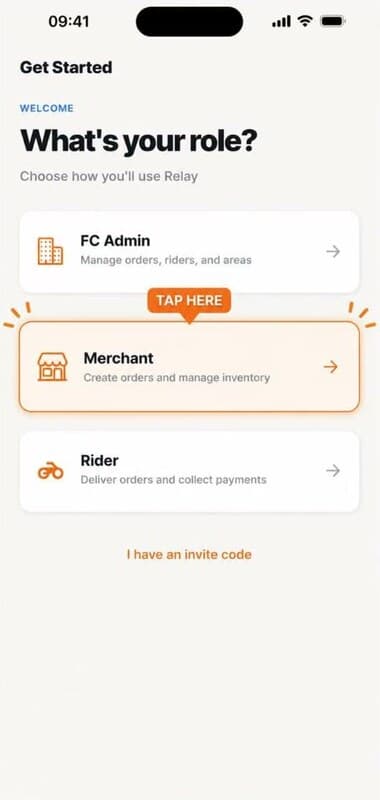
Download Relay. Pick Merchant.
Install the app. Open it. On the role picker, tap the Merchant card.
- Sign up with your phone number — 30 seconds.
- Already have a code from your FC? Tap “I have an invite code” to skip ahead.
You're set up as a merchant.
Every order you create now ships with a PIN. The customer tracks it themselves. You stop answering “any update?” messages.
Questions everyone asks during setup.
Six that come up the most. The full list is on the FAQ page.
Full FAQIs Relay free?
Free for merchants and riders, forever. Fulfillment centers pay ₦100 per delivered order after a 2-week free trial — no monthly fee, no per-user fee, unlimited team size.
What if my fulfillment center isn't on Relay yet?
Fill in the “Tell my FC” form on the merchants page. We reach out within 24 hours.
Does my customer need to install anything to track their order?
No. Every order ships with a 6-digit PIN they enter on the public tracking page — any browser, no app, no login.
Where do I get an invite code as a merchant or rider?
From the fulfillment center. They add you from their Profile → People tab and send the code over WhatsApp or SMS. You paste it on sign-up.
Can I import my existing catalog and pricelist?
Yes. Merchants can upload a CSV or paste a store URL. FCs can import pricelists from a photo, image, or PDF.
What if I'm shipping from more than one warehouse?
Add each as a separate FC. Merchants pick which FC ships each order. Stock stays separate per warehouse.
You've seen the deck. Now take the steps.
Install Relay. Pick your role. You'll be live before the kettle boils.
Free for merchants and riders. Free for FCs for two weeks, then ₦100 per delivered order.